Habib_
Members
-
Joined
-
Last visited
-
thanks alot, this is very useful...
-
Hey Fuzzy what to do after entering pattern name, because I tried many times but no result... I follow your instructions likewise... I selected an area with rectangle marquee, feather was already 0px, then I go to edit and clicked on define pattern, a new window opened asking for a pattern name, I entered pattern name and clicked ok, but it didn't ask me for any picture, which i want to use as pattern, simply there was no results on screen, it remains same as it was before.
-
thanks again....
-
thanks fuzzy for the answer and the tutorial link. But what to do if I want to use an image as pattern?
-
How can i add custom pattern like that in attachment. the designers used dome kind of logo for drawing a pattern in the shown picture. Thanks in advance...

-
Thanks Fuzzy, I m sorry I didn't know the exact term for that that's why I mentioned "some kind of" merginh.. Anyhow thanks for the solution your provide...
-
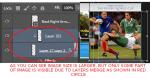
I did it and I think short key for that is cntrl + E but I couldn't get the above effect, as you can see in the pic that the above layer is point down to second layer, means that the above layer goes behind the second layer.
-
How can I perform this as shown in red circle, in attached file. Thanks for help in advance.