Synoptic
Members
-
Joined
-
Last visited
-
Thanks ElanMan, "The content is simply hidden (visually) by javascript" I was led to believe that hiding any text/content was a bad thing in SEO, as most big search engine frown terribly upon that type of thing. And in relation to the javascript being enabled, I had that in mind, and the site is being designed so that if the Javascript section is visible the rest of the site will still be functional and wel presented. LOL might just need a little bit of a scroll down to get the content. I am hoping to use two tabs within that slide down section for my Site Map and Contact form. Thanks again for the reply, its very appreciated! David
-
Thanks a million guys for the warm welcome, and I can assure you you will see me smeared all over the forums hahahaha Nah I will follow the rules and all the rest, there is just a lot I want to learn.....and I find that once you learn something it just opens up more questions hahahah But thanks again! David
-
This is a 2 part question regarding Moo Tools Javascript Framework. I recently happened across a site with a feature which I absolutle love, and in the name of experimentation and learning I would like to emulate a similar effect on my own site. After a bit of chasing and reading I found out that the effect was created with Moo Tools. The effect in question is a drop down window that moves the rest of the site "down" when it slides out. I had a look at the Moo Tools website and it clearly states that Moo Tools is developed for people who have at least some understanding of Java script which I don't You can see the effect I am talking about at http://www.jek2k.com and clicking on the "Feeling Lost" link at the top of the page! Question 1: Would somebody out there be able to help me replicate this effect. I am not adverse to learning I am just wanting to get my own site up as quickly as possible and find the best way to learn these things is to ask somebody in the know! Question 2: Now this is a bit more tricky to answer as it relates to SEO. I am wondering how 'SEO Friendly' content contained within the silde down section is. Will it be checked and processed properly by a spider, or will it just get overlooked. Like many developers out there, ranking matters and I would not want to risk ranks just for the sake of 1 cool feature! Thanks in advance to anybody who replies! David
-
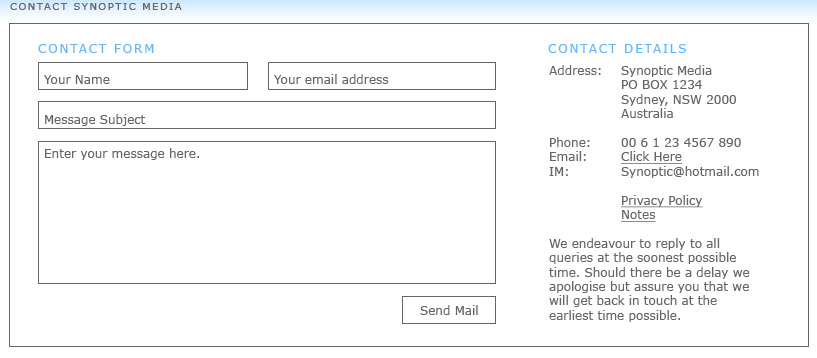
I am sure this has been asked at least a thousand and one times in one form or another, but I think/hope that my question comes from a different angle. I am fully aware of PHP mail forms and their greatness, the only problem I am having and this is coming from a graphic designers point of view, is how to arrange/style it so that it would suit the layout I am working on. I have found many fantastic PHP mail scripts out on the web, from the simplest to the most complex and secure mail scripts available. Ideally what I am looking for is a PHP mail script that will follow the layout I have attached. I have no idea ho to achieve this with the scripts that I have found and would seriously appreciate some pointers or links. Thanks a million in advance. David PS: I know sweet bugger all about PHP except to change the variables needed to make the form work hahahah -D-
-
hey there guys and girls! How are ye all! Well quite obviously from the location of this post I am new to these forums and just thought I would say hello a give you all some background info on myself....not that anybody is interested heehee but here goes! My name is david, I am 28 and irish, though living in sydney australia at the moment. I have decided once and for all to make a decent go at the whole web design thing. And with that in mind I am now starting my own little solo web design company. I am a self taught graphic artist, I know the basics or xhtml and css and I am currently study SEO. And though I may be no expert, I can say that what I lack in knowledge I make up for in passion and determination to learn and excel in what i want to do! So with all that in mind be prepared for many and loads of questions David