Burns
Members
-
Joined
-
Last visited
Everything posted by Burns
-
Thanks, I'll give it a try.
-
Thanks for the reply, just what I was looking for. Do you know if there is a way to have the spacing between the blocks of text even? Would I need to play around with the individual widths? Thanks
-
Hi, Thanks for the reply, It is a set of 5 individual sentences of between 3 and 5 words. Thanks
-
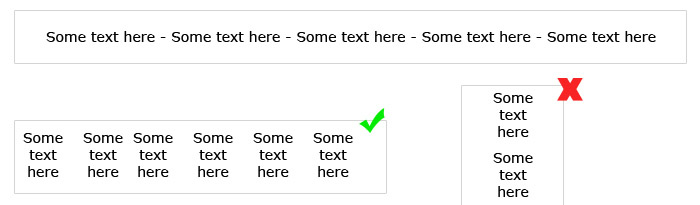
Hi, I have been trying for the last couple of hours to try and achieve this and I'm about to give up. It seems fairly simple but I just can't achieve the desired effect and I'm starting to wnder if it's actually possible. Basically, I have liquid site layout and I want to have a centred horizontal list of text the wraps for different resolutions: As you can see from the attached image, when the browser is at larger resolutions I want the text centered but at lower resoultions to wrap properly(each line wraps, not each block of text. I have tried various things; display: inline block, floats etc but I just can't get the desired result. Hopefully this makes sense. Any suggestions would be great appreciated. Thanks

-
I have a problem. I have a layout similar to this http://layouts.ironmyers.com/100_percent_Layouts/layout/?id=1 where the left column contains a tree menu like sample 3 on this page http://jquery.bassistance.de/treeview/demo/ the trouble is the menu can go down several levels and I thought it would be possible for the div to resize its width when the menu expands. I know could set a fixed width and have scrollbar (as this is what I have in place) but I was wondering if there is a way for he left column to expand based on its contents and to make the main content contract, does that make sense? I thought it would be possible to have to divs side by side, both without widths and for them to expand and contract accordingly but I can't get this to work. If the only option is a fixed width with a scrollbar then so be it. Thanks in advance.
-
Anyone? struggling a bit with this.
-
Hi, I have been tasked with creating a photo gallery website. The client doesn't want to spend much on it and has asked for something to be setup quite quickly. I was set on a WordPress solution but I am finding it quite difficult to find the exact theme that they require. I choose WordPress as the backend as it is fairly simple to use and easy to setup. They require something similar to this http://www.dathemes.com/demo/index.php?theme=may09 which is the theme I decided to go for. Unfortunately I have since discovered that you need to pay extra for the full theme to have the ajax transitions, which isn't an option. The main requirement is the layout so that there is a main image with thumbnails selectable underneath. It also has to have a backend for the photo uploads. Do you think WP is the best solution? Thanks
-
Thanks for all the replies, the Veerle link really helped, Cheers Aaron
-
Are you sure? will it validate correctly? When I try and nest a P tag with an A tag I get validation errors? Thanks for the reply btw
-
Hi, I have been trying without success to have a div as an anchor link. I know their are methods using JS but I would like to avoid this if possible and use only CSS. The trouble that I am having is that the DIV that is to be the link contains other Block level elements (div,p) and won't validate properly. I know their is away of doing it so that the A tag has a display:block attribute but you can't have other Block level elements within the <A> tag. Is their another method using CSS? Thanks