eekhoorn
Members
-
Joined
-
Last visited
Everything posted by eekhoorn
-
So its not confined to firefox doing it in all the browsers now!
-
No not got a clue what is is or where it coming from. Strange it only does this in FF2, in FF3 it does not display the info in the browser but asks you to download a php file of the page?
-
Hi just wondering if anybody else has had any problems with PHP and Firefox. I have just finished building a gallery for a client site, I gave it a test and it worked fine in IE6-7 and in Safari. But it all goes wrong in Firefox. On random clicks of the button to access the gallery, instead of it displaying the gallery page it shows a whole bunch of jumbled code, my page code is inside there somewhere, but is full of junk. It does not happen on every click just randomly. I have torn my code apart and cant find any problems with it the only thing i noticed is when I remove a string from the end of the url ie display.php?album=3 and just point to the normal domain display.php. It does not happen. Anyone else had this problem before - could it be the server I am using, i have put the head of the sample code below to show what I am getting. HTTP/1.1 200 OK Date: Wed, 03 Sep 2008 07:37:26 GMT Server: Apache/2.2.8 (Unix) mod_ssl/2.2.8 OpenSSL/0.9.8b mod_bwlimited/1.4 X-Powered-By: PHP/5.2.6 Keep-Alive: timeout=5, max=99 Connection: Keep-Alive Transfer-Encoding: chunked Content-Type: text/html 161 <!DOCTYPE html PUBLIC "-//W3C//DTD XHTML 1.0 Transitional//EN" "http://www.w3.org/TR/xhtml1/DTD/xhtml1-transitional.dtd"> <html xmlns="http://www.w3.org/1999/xhtml"> <head> <meta http-equiv="Content-Type" content="text/html; charset=utf-8" /> <title>Untitled Document</title> <link href="../~styles/globalstyle2.css" rel="stylesheet" type="text/css" /> 2 <s 3d cript type="text/javascript" src="../js/jquery.js"></script> 2 <s d6 cript type="text/javascript" src="../js/jquery.innerfade.js"></script> <link rel="stylesheet" href="../~styles/prettyPhoto.css" type="text/css" media="screen" title="prettyPhoto main stylesheet" charset="utf-8" /> 2 <s 1a6 cript src="../js/prettyPhoto.js" type="text/javascript" charset="utf-8"></script> </head> <body class="globalcomponents"> <div id="container"> <div id="header"> </div> <div id="menu"> <ul> <li> <a href="../sandpit/index.html"> HOME </a> </li> <li> <a href="../sandpit/about.html"> ABOUT US </a> </li> <li> <a href="../sandpit/contact.html"> CONTACT </a> </li> <li> <a href="leisuregalle 19f ry.php?album=3"> LEISURE & HOTEL </a> </li> <li> <a href="barrestaurant.php?album=4"> BAR & RESTAURANT </a> </li> </ul> </div> <div id="subheader"> <img src="../assets/headers/bar.jpg" alt="Global Reception" width="860" height="140" /> </div> <div id="gallery"> <h3>An Extensive Range</h3> <p>Because we offer such a wide range of product lines and are constantly sourcin 197 g the best products from around the world it is impossible for us to show all of the fantastic products that we supply, this gallery is just a taste of some of the fine quality<br /> furniture that we offer.</p> <h3>Don't See What You Are Looking For?</h3> <p>Give us a call tell us what you require and we’re happy to upload more examples from our range.</p> <div id="gallerydynamic" 4 > ??? Im just confused!
-
Cheers Rob, I hate staring at code sometimes when you are tired, you always seem to miss the simple things, I think it is better to just give up go to the pub and have a beer, and nine times out of ten when you return you look at it and go, Doh thats why straight away.
-
bingo we have a winner, that seems to have done the job, been staring at this for to long now, only just added the links today and it all went 'Jericho' never thought about the simple things like that, cheers ElenMan
-
I have removed the h1 altogether and it still does the same thing as before, it somehow seems to clear the float on the image as soon as I apply the A tag to the image! When I remove the A tag from the image it works fine. that copy is only part of the page not the full page of code <!DOCTYPE html PUBLIC "-//W3C//DTD XHTML 1.0 Transitional//EN" "http://www.w3.org/TR/xhtml1/DTD/xhtml1-transitional.dtd"> thats the doctype
-
oops not paying attention, nahh not the problem, it works fine as long as there is no a tag on the image as soon as I apply this is seems to clear the float somehow!
-
Nahh no luck have created two divs and tried all forms of floating, and display ways, it works fine if there are no links but as soon as I add them it breaks!
-
tried the display:block; that was my first thought. Never thought about the other stuff in a div will have a go and see
-
Has anybody has any problems using floated elements in IE6 in combination with links? I have a page with a list of products, including an image thumb, product title, and description. I have the image set to float left so it appears on the left side of the div and the title and description will appear alongside. It works fine in FF and IE7 but in IE6 it seems to clear the float and drop the text below the image as soon as I make the image a link. Live page is here: http://www.creativgroup.com/sandpit/emmers...ershutters.html div code is: <div class="rangeList"> <a href="commander.html"> <img src="../assets/doorImages/commanderThumb.gif" alt="Commander Thumb" class="thumb" /> </a> <a href="commander.html"> <h1>Commander</h1> </a> <p>A self-coiling puch up / pull down shutter, for openings up to 9 sq meters appox, in area. Manually operated by means of a pole and hook or by lifting handles. Electrical operation can also be offered.</p> <a href="commander.html"> <img src="../assets/coreElements/moreButton.gif" alt="Commander More" class="more" /> </a> </div> controlling css is: /* Itemised Range List */ .emmerson .rangeList { background: url(../assets/coreElements/dot.gif) bottom left repeat-x; width: 477px; height: 120px; margin: 25px 0 0 0; padding: 0 20px 0 0; } .emmerson #rangeList h1 { display: block; font-weight: bold; font-size: 14px; color: #666; padding: 0; margin: 0; } .emmerson #rangeList p { display: block; font-size: 12px; color: #666; padding: 0; margin: 0; } .emmerson #rangeList img.more { display: block; margin: 4px 0 0 0; } .emmerson #rangeList img.thumb { display: block; float: left; margin: 0 10px 0 0; } It is also doing the same with this page: http://www.creativgroup.com/sandpit/emmerson/ gav
-
try removing the display:block; from the li I have had problems with this in the past as when you use float with some of the display classes, it adds 3px padding to each side which would explain the line drop. Alto it worked fine in my FF
-
http://www.creativgroup.com/sandpit/emmers.../commander.html got it working in the page now, cheers for all the input
-
Yeah it is a bit of a strange one, you also need to declare any images as display:block; otherwise they will not render. The spans seem to work ok tho
-
Cheers ElenMan just figure it out as you posted it tho I forced the :hover effect in IE6 by declaring a non associated a:hover class which acted as a trigger for any other hover effects. Then simply declared the image as display:block; on both the a and a:hover classes. It seems to have done the job. Code for any interested party's. #productContainer { font-family: Arial, Helvetica, sans-serif; width: 497px; margin: 0; padding: 0; } #productDetail p { padding: 0; margin: 0; } #productDetail img.mainImage { float: left; padding: 0; margin: 0 5px 0 0; } #productDetail a:hover { background-color: #FFFFFF; } #productDetail a { font-family: Arial, Helvetica, sans-serif; color: #666; font-weight: bold; font-size:14px; text-decoration: none; } #productDetail a img { display: block; height: 0; width: 0; border-width: 0; } #productDetail a:hover img { display: block; height: 90px; width: 90px; } #productDetail a span { display: none; } #productDetail a:hover span { display: block; } Cheers for all your help and input
-
Yeah thats pretty much the idea. I just managed to get the span to appear by forcing a trigger on the a:hover class but it only shows the span not the image. Fire Away
-
IE6 and before doesn't support :hover in CSS. http://snipplr.com/view/1912/internet-expl...-ie6-css-hover/ bugger wanted to avoid using JAVA at all costs for any kind of rollover effects, I already have a 7500line external Java file running the accordation effect.
-
http://www.creativgroup.com/sandpit/emmers...ng/product.html Still does the same, altho the span does appear on click in IE6 but not the image! EDIT: tried using display:none; on the image instead of dimention change and sitll no luck
-
Did a bit of researching and found a bug in IE5 that does not support dynamic image resizing, once you set the height and width of an image it is set permanently meaning when I set it to 0px x 0px at the start it will always be that size, maybe this issue has been carried forward to IE6 and not documented. Will have a go and see if the span with text only works.
-
Hi Rob No change still works in IE7/FF but displays the image below the larger image, but no change in IE6! Gav
-
Hi all Ok so the site I am working on at the moment requires the user to roll over some text and an image and text to appear at a different point on the page. I have managed to do this by effectively hiding the image and span that contains the text and then displaying it, and setting an absolute position on a rollover state. This works fine in everything but IE6. I have put my code below that control it and a link to the page that is live. /* Interactive Product Image*/ .emmerson #productDetail { width: 497px; height: 336px; margin: 0 0 10px 0; padding: 0; } .emmerson #productDetail p { line-height: 12px; padding: 0; margin: 0; } .emmerson #productDetail img.mainImage { float: left; padding: 0; margin: 0 5px 0 0; } .emmerson #productDetail a { font-family: Arial, Helvetica, sans-serif; color: #666; font-weight: bold; font-size:14px; text-decoration: none; } .emmerson #productDetail a img { height: 0; width: 0; border-width: 0; } .emmerson #productDetail a:hover img { position: absolute; top: 0; right: 0; height: 90px; width: 90px; } .emmerson #productDetail a span { display: none; } .emmerson #productDetail a:hover span { display: block; position: absolute; top: 0; right: 0; width: 90px; padding: 0; margin: 5px 0 0 0; z-index: 100; color: #666666; font-family: Arial, Helvetica, sans-serif; } .emmerson #productDetail a:hover span p { padding: 90px 0 0 0; } Live Site http://www.creativgroup.com/sandpit/emmers.../commander.html Full CSS http://www.creativgroup.com/sandpit/emmers...mainControl.css code is on line 484 Any help on this mystery would be good, I have already resided to the fact that IE6 will not do this, so a solution would be great! gav
-
Tell a lie that has not worked its 100% off the browser window but if content goes out the bottom the container will not go with it.
-
Sorted changed design a bit and used the #container to hold the gradient and floated the left menu and main copy left and right. http://www.creativgroup.com/cpartnership/
-
You are missing a whole load of java from the head of your document, have a look at the source code for the example at mootools. You need to define the java actions in the head of the document, that are relevant to the functions in the java you are linking to.
-
I have changed the #content to #content { position:relative; bottom:0px; width:750px; margin:8px 0 0 0; padding:0px; background-color:#CCCC55; } but that does not set the height of the box it just sends it to the bottom and I have to define the height still.
-
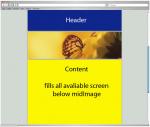
Hey decided to stop using tables and get with the program, but have hit a hurdle thats becoming annoying. My layout is basically a header middle image and the main content all within a #container, the header and middle image are fixed height and I want the content to fill the rest of the space, but can't get it to fill in what space is missing, it just runs off the bottom of the page and creates a massive content section. I have made a more basic version of my page as not to confuse, blue box is header, brown is midImage, green is container and yellow is content. My CSS Code: body, html { height:100%; } body { margin:0px; padding:0px; text-align:center; } #container { margin:0px auto; padding:0px; width:750px; background-color:#006633; height:auto; min-height:100%; height:100%; } #header { margin:0px; padding:0px; height:165px; background-color:#003399; } #midImage { margin:8px 0 0 0; padding:0px; height:220px; background-color:#993300; } #content { width:750px; margin:8px 0 0 0; padding:0px; background-color:#CCCC00; height:100%; } My HTML Code: <!DOCTYPE HTML PUBLIC "-//W3C//DTD HTML 4.01 Transitional//EN" "http://www.w3.org/TR/html4/loose.dtd"> <html> <head> <meta http-equiv="Content-Type" content="text/html; charset=iso-8859-1"> <title>Untitled Document</title> <link href="test.css" rel="stylesheet" type="text/css"> </head> <body> <div id="container"> <div id="header"></div> <div id="midImage"></div> <div id="content"></div> </div> </body> </html> Here is a live link to show what it is doing as you can see the yellow box is going off the screen at the bottom instead of just filling the rest of the page up. http://www.creativgroup.com/cpartnership/n...esttemplate.htm I have also attached a jpg to show you how I intend it to look. Any help would be fantastic, I have searched the web and many forums but so far have not come up with a solution?