marieidat
Members
-
Joined
-
Last visited
-
I second the vote for Fireworks - but a word of caution, Fireworks (default format) PNG's have a much bigger filesize than Flattened PNG's. Choose the Flattened option and you're good to go!
-
Brilliant, thankyou. Should have realised that. Thanks for your help.
-
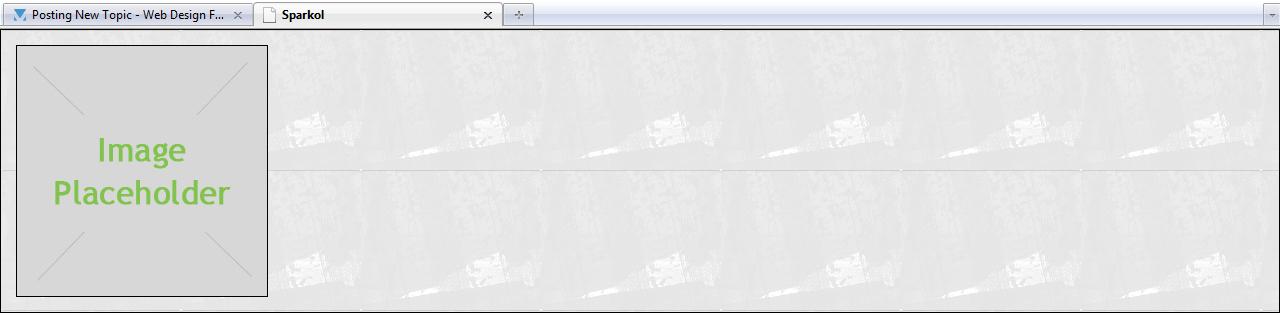
I'm trying to add a 15px border around each image, with a background image filling the border. But, the right border is filling the width of the page (or whatever container div it's in), rather than being 15px from the edge of the image. (See attached screenshot) My guess is that this is something to do with images displaying inline, but is there a way I can fix it? I understand that I can set it to a fixed width of 15px wider than the image, but I'd like to be able to use the same div code for a few different images with different widths. Is there a way to get the border image to automatically be 15px wider than the image? Here is my HTML code: <html> <head> <title>CSS Image Border</title> <meta http-equiv="content-type" content="text/html; charset=utf-8" /> <link rel="stylesheet" type="text/css" href="imageborder.css" media="screen" /> </head> <body> <div id="img-bg"> <img src="Images/placeholder.jpg" alt="placeholder"/> </div> <!--end #img-bg--> </body> </html> And here is my CSS: body { margin:0; padding:0; height:100%; background:#000; color:#000000; background: url(Images/BG/BG_all.png); } #img-bg { border: 1px solid #000; background: url(Images/img_bg.png); display: block; } #img-bg img { display: block; border: 1px solid #000; margin: 15px; background: #FFFFFF; } Thanks, Marie