mrFrank
Members
-
Joined
-
Last visited
-
Hello. I am mid-designing my new eCommerce website which will soon be powered by Magento. All my product images will be basic and a single colour. Every product will also allow the user to customise the colour. I want to have a drop down <select> box (or something similar) that displays the available colours and when the user selects a colour their selection will change the colour of the product image. BUT I want to do this in a way that does not require me to make multiple images. I would like it to change dynamically (if that is the right word to use). At first I thought of making the coloured area of the image transparent and somehow changing the background colour with jquery and css... but I don't know if that is possible. Is it? Anyone got any suggestions on how I can achieve this? Thanks a lot . -Frank
-
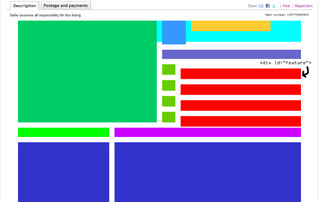
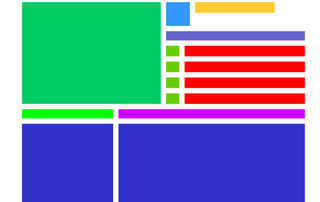
Hello. I am having a wee bit of trouble: I have coded a layout for an ebay listing. It works exactly the way I want it to when I preview it in a browser but there is one part that dose not work (well two, but I am not bothered about one of them) when I preview it on ebay.co.uk. Here is my code: <!DOCTYPE html PUBLIC "-//W3C//DTD XHTML 1.0 Transitional//EN" "http://www.w3.org/TR/xhtml1/DTD/xhtml1-transitional.dtd"> <html xmlns="http://www.w3.org/1999/xhtml"> <head> <meta http-equiv="Content-Type" content="text/html; charset=utf-8" /> <title>Untitled Document</title> <style type="text/css"> #wrapper{ width:1070px; margin:auto; background-color:#0FF; } #mainImage{ float:left; width:525px; height:385px; background-color:#0C6; } #badge{ float:left; width:90px; height:90px; margin-left:20px; background-color:#39F; } #title{ float:left; width:300px; height:40px; margin-left:20px; background-color:#FC3; } #featureBar{ float:left; width:525px; height:35px; margin-left:20px; margin-top:20px; background-color:#66C; } .work{ float:left; margin-left:20px; margin-top:20px; width:525px; height:40px; } .tick{ float:left; width:50px; height:40px; background-color:#6C0; } .feature{ float:left; margin-left:20px; width:455px; height:40px; background-color:#F00; } #specBar{ float:left; width:345px; height:35px; margin-top:20px; background-color:#0F0; } #descBar{ float:left; width:705px; height:35px; margin-left:20px; margin-top:20px; background-color:#C0F; } #specText { float:left; width:345px; height:300px; margin-top:20px; background-color:#33C; } #descText{ float:left; width:705px; height:300px; margin-top:20px; margin-left:20px; background-color:#33C; } #videoBar{ float:left; width:1070px; height:35px; margin-top:20px; margin-bottom:20px; background-color:#C0F; } #video{ float:left; margin-left:108.5px; width:853px; height:480px; background-color:#F39; } #imagesBar{ float:left; width:1070px; height:35px; margin-top:20px; background-color:#C0F; } .galImage1 { float:left; width:525px; height:381px; margin-right:20px; margin-top:20px; background-color:#C60; } .galImage2 { float:left; width:525px; height:381px; margin-top:20px; background-color:#C60; } .galTitle1{ float:left; margin-top:10px; margin-right:20px; width:525px; height:30px; border-color:#666; border-bottom-width:medium; background-color:#06C; } .galTitle2{ float:left; margin-top:10px; width:525px; height:30px; border-color:#666; border-bottom-width:medium; background-color:#06C; } #postageBar{ float:left; width:1070px; height:35px; margin-top:20px; background-color:#C0F; } #rmLogo{ float:left; width:165px; height:110px; margin-right:20px; margin-top:20px; background-color:#6F6; } #postageText{ float:left; width:885px; height:400px; margin-top:20px; background-color:#F39; } #warBar{ float:left; width:1070px; height:35px; margin-top:20px; background-color:#C0F; } #warText{ float:left; width:1070px; height:500px; margin-top:20px; background-color:#9CC; } </style> </head> <body> <div id="wrapper"> <div id="mainImage"> </div> <div id="badge"> </div> <div id="title"> </div> <div id="featureBar"> </div> <div class="work"> <div class="tick"> </div> <div class="feature"> </div> </div> <div class="work"> <div class="tick"> </div> <div class="feature"> </div> </div> <div class="work"> <div class="tick"> </div> <div class="feature"> </div> </div> <div class="work"> <div class="tick"> </div> <div class="feature"> </div> </div> <div id="specBar"> </div> <div id="descBar"> </div> <div id="specText"> </div> <div id="descText"> </div> <div id="videoBar"> </div> <div id="video"> </div> <div id="imagesBar"> </div> <div class="galImage1"> </div> <div class="galImage2"> </div> <div class="galTitle1"> </div> <div class="galTitle2"> </div> <div class="galImage1"> </div> <div class="galImage2"> </div> <div class="galTitle1"> </div> <div class="galTitle2"> </div> <div id="postageBar"> </div> <div id="rmLogo"> </div> <div id="postageText"> </div> <div id="warBar"> </div> <div id="warText"> </div> </div> </body> </html> I am having trouble with div class="feature". Why does it look different on ebay than in a browser? I am not too bothered about this problem, but why does div id="wrapper" not show up at all in a broswer and only a small amount at the top in ebay? I have attached some screenshots. I hope someone can help me out Thanks very much -Frank

-
Ha ha! Nice one!
-
Hey every one! My name is Frank and I am 18. Taking a gap year out before I go onto to study Graphic and Web Design. This is my first post here on WebDesignerForum.co.uk! Had a look around and it seems like a nice community (also did a search for my problem with no luck). Right - onto my problem. What I have been asked to do is make a website that allows users to receive updates from multiple social networks on the same page. So if a user was to sign in they would instantly see all their updates from their favorite blogs, twitter, Facebook etc. After days and hours of searching for a solution I have had no luck so i hope someone here can help me out please! I have searched for things that involve RSS feeds and JavaScript but I don't know if thats the right way to go.. It's a tough one, I know, but ANY help leading me in the right direction would help greatly! Thank you and I look forward to hearing your ideas! -Frank