hawkeyehatton
Members
-
Joined
-
Last visited
Everything posted by hawkeyehatton
-
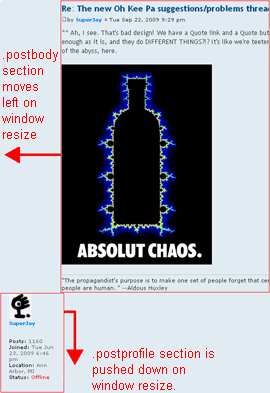
I have recently started a forum at phpBB and am currently tweaking the styles to get it how I want it to look. One thing I did was move a little box called .postprofile (the user profile) from the right over to the left and .postbody (where the message is placed) from the left over to the right. Now, whenever I resize the window horizontally, things go a bit odd. The right float seems to overlap the left and push it down. I have made a couple of screenshots to try and better illustrate what I mean. Window full size Window resized horizontally These are the styles from the stylesheet: .postprofile { margin: 5px 0 10px 0; padding-right: 15px; min-height: 80px; color: #666666; border-right: 1px solid #FFFFFF; width: 16%; float: left; display: inline; } .postbody { padding: 0; line-height: 1.48em; color: #333333; width: 82%; float: right; } How can I stop .postbody invading .postprofile's territory?! I just want the floats to work like they do on this board here. If I resize this window horizontally, nothing is pushed out of the way and it looks fine at all sizes. Please help! Ian


-
Hello everyone out there at webdesignerforum.co.uk! My name is Ian, I'm 25 and I live in London. I have been studying with the Open University since last June in order to start a career in web design. I am still relatively new to some aspects of this beast and so will be asking your help and advice on some things in the other forums! Glad to be on board!